Facebook CPO Chris Cox Donates Locally With $1M Gift To East Palo Alto’s Live in Peace


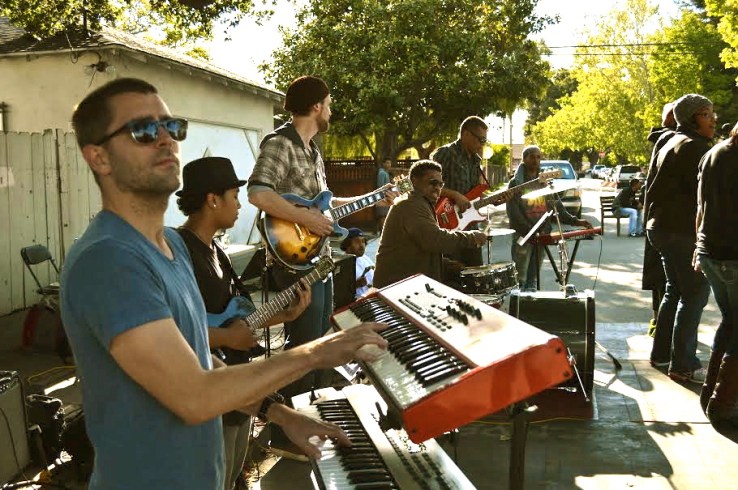
Almost a decade ago, Facebook’s chief product officer Chris Cox (pictured above) started playing weddings with a reggae band out of East Palo Alto. At the time, the company had barely launched beyond college campuses and Cox had just finished Stanford.

East Palo Alto, in contrast, is this community that sits right across the Highway 101 from Palo Alto, the originally home city of Silicon Valley which gave rise to iconic companies like Hewlett-Packard, VMWare, Tesla and Facebook itself.

Unlike its neighbor to the west, East Palo Alto has double the unemployment rate and one-third of its residents lack more than a high school diploma. As I wrote about last month in a very long and through history, a lot of this has to do with unjust land-use and local government policies from the past 70 years.

Today, Facebook’s headquarters sits right on the Menlo Park and East Palo Alto border, and the city has shifted toward a Latino majority from its historically black roots. It is one of the last bastions of affordable housing on the peninsula.

As Facebook rocketed toward a multi-billion dollar IPO, Cox stayed involved in East Palo Alto. When one of his bandmates, Justin Phipps, partnered with other community leaders to teach music and college readiness to children in after school programs a few years ago, Cox helped them pay for space and a studio in a house that used to be a Black Power elementary school in the 1970s.

“It started from my musical relationship with him,” Phipps said. “But now it’s been cemented into an actual partnership with the community.”

Cox has never been very public about his commitments, but now he’s giving $1 million to Phipps’ organization Live in Peace.

“This is something that we wanted to announce to shine a light on philanthropy that is local,” said Cox.

Cox is aware that one million dollars isn’t enough to address the city’s mounting challenges with affordable housing and gentrification, but he’s worked with Live in Peace for so many years that he knows they provide something valuable to the city.

“It’s very hard because it’s so pressurized and it’s such a big problem. I don’t pretend that this is the whole solution to everything,” Cox said. “But when you find something where you know the people are good and the organization is good, paying attention to that is the right thing to do even without knowing the whole answer.”

With Stanford students Shadi Barhoumi and Rafael Cosman, Live in Peace recently opened Streetcode Academy, which teaches programming, mobile app development and Arduino to students at the campus of an old remedial school.

It’s a holistic approach. If you ever visit on one of their hack days (and I have several times), there are kids playing basketball, beatboxing and working on hardware.

“There is this idea that all these young kids need is technical training,” said Olatunde Sobomehin. “But what has been missed or is really difficult to grasp is that Live in Peace is more than these coding classes. It’s this whole other spirit and energy.”

Comments

Popular posts from this blog

Build Your Own Awesome Personal 3D Avatar with Avatara

Do you use social networks and want to build your own awesome 3D avatar? Maybe you want to send someone a cute cuddly image of yourself (kind of)? Or maybe you have your own ideas of what you would do with an Avatar… Well look no further than Avatara which I discovered from the MakeUseOf directory . You can create 3d avatars out of pre-set up templates or create your own from scratch. To start, visit Avatara’s homepage . You will see this screen: Click Get Started to umm, get started! That will take you to this screen: You see that you can build your own Avatar using an uploaded head shot like the Obama one above (just an example, guys). Or roll with one of their awesome avatars. I chose to start with a blank avatar by clicking Start with a blank avatar at the bottom of the screen. That takes you to here: I clicked on the filter at the top and told it to filter out everything but male characters and then I saw this: I rolled with Buck and continued. You need to click Select...

Fun Tools to Translate Your Name into Japanese Calligraphy

Japanese calligraphy is an artistic writing style of the Japanese language. Its Chinese origins can be traced back to the twenty-eighth century BCE. Calligraphy found its way into Japanese culture in 600 CE and is known as the karayo tradition. For Westerners, calligraphy is forever fascinating. However, it takes years to learn how to properly draw the signs. Two basic principles must be known to understand Japanese writing: there are different writing styles and different alphabets. Kaisho for example, is a writing style most commonly used in print media. Tensho on the other hand is used in signatures. Other writing styles are Reisho, Gyosho and Sousho. The alphabets include Kanji, Hiragana, and Katakana. Katakana is used for writing foreign words. It can also serve to highlight words, in analogy to capital letters as we know them from the Roman / Latin alphabet (Romaji in Japanese). Each Kanji character has a meaning of its own, while Hiragana or Katakana characters merely repres...

Boom, the startup that wants to build supersonic planes, just signed a massive deal with Virgin

Have you heard about Boom? Boom is a relatively new startup that’s aiming to build something pretty crazy. They’re not building an app… or a social network… or even some new gadget for the Kickstarter crowd. Boom wants to build planes. Really, really, really fast planes. Specifically, they’re trying to design and build a supersonic passenger plane that goes 2.2x the speed of sound. If all goes to plan, they’ll be able to shuttle people from New York to London in 3.5 hours, and SF to Tokyo in 4.5. Sound crazy? I wouldn’t disagree. It’s worth noting that the company is in the very early days for something as intensive, massive, and hugely expensive as designing and producing a passenger aircraft. They’re still working on their first prototype, and hope to fly it by late next year. But it’s also worth noting that the team behind the plane has some serious talent in its blood: the company’s 11 employees have collectively contributed to over 30 aircrafts — having worked on thin...